
Close Menu
    Facebook X (Twitter) Instagram
    • About
    • Privacy Policy
    • Contact Us
    Friday, December 5
    Facebook X (Twitter) Instagram
    codeblib.comcodeblib.com
    • Web Development

      Building a Headless Shopify Store with Next.js 16: A Step-by-Step Guide

      October 28, 2025

      Dark Mode the Modern Way: Using the CSS light-dark() Function

      October 26, 2025

      The CSS if() Function Has Arrived: Conditional Styling Without JavaScript

      October 24, 2025

      Voice Search Optimization for Web Developers: Building Voice-Friendly Websites in the Age of Conversational AI

      October 20, 2025

      Voice Search Optimization: How AI Is Changing Search Behavior

      October 19, 2025
    • Mobile Development

      The Future of Progressive Web Apps: Are PWAs the End of Native Apps?

      November 3, 2025

      How Progressive Web Apps Supercharge SEO, Speed, and Conversions

      November 2, 2025

      How to Build a Progressive Web App with Next.js 16 (Complete Guide)

      November 1, 2025

      PWA Progressive Web Apps: The Secret Sauce Behind Modern Web Experiences

      October 31, 2025

      Progressive Web App (PWA) Explained: Why They’re Changing the Web in 2025

      October 30, 2025
    • Career & Industry

      AI Pair Programmers: Will ChatGPT Replace Junior Developers by 2030?

      April 7, 2025

      The Rise of Developer Advocacy: How to Transition from Coding to Evangelism

      February 28, 2025

      Future-Proofing Tech Careers: Skills to Survive Automation (Beyond Coding)

      February 22, 2025

      How to Build a Compelling Developer Portfolio: A Comprehensive Guide

      October 15, 2024

      The Future of Web Development: Trends to Watch in 2025

      October 15, 2024
    • Tools & Technologies

      The Future of AI Browsing: What Aera Browser Brings to Developers and Teams

      November 24, 2025

      Gemini 3 for Developers: New Tools, API Changes, and Coding Features Explained

      November 22, 2025

      Google Gemini 3 Launched: What’s New and Why It Matters

      November 19, 2025

      A Deep Dive Into Firefox AI Features: Chat Window, Shake-to-Summarize, and More

      November 18, 2025

      10 Tasks You Can Automate Today with Qoder

      November 16, 2025
    codeblib.comcodeblib.com
    Home»Tools & Technologies»Google Opal Explained: Build AI Mini-Apps Without Writing Code
    Tools & Technologies

    Google Opal Explained: Build AI Mini-Apps Without Writing Code

    codeblibBy codeblibOctober 29, 2025No Comments4 Mins Read
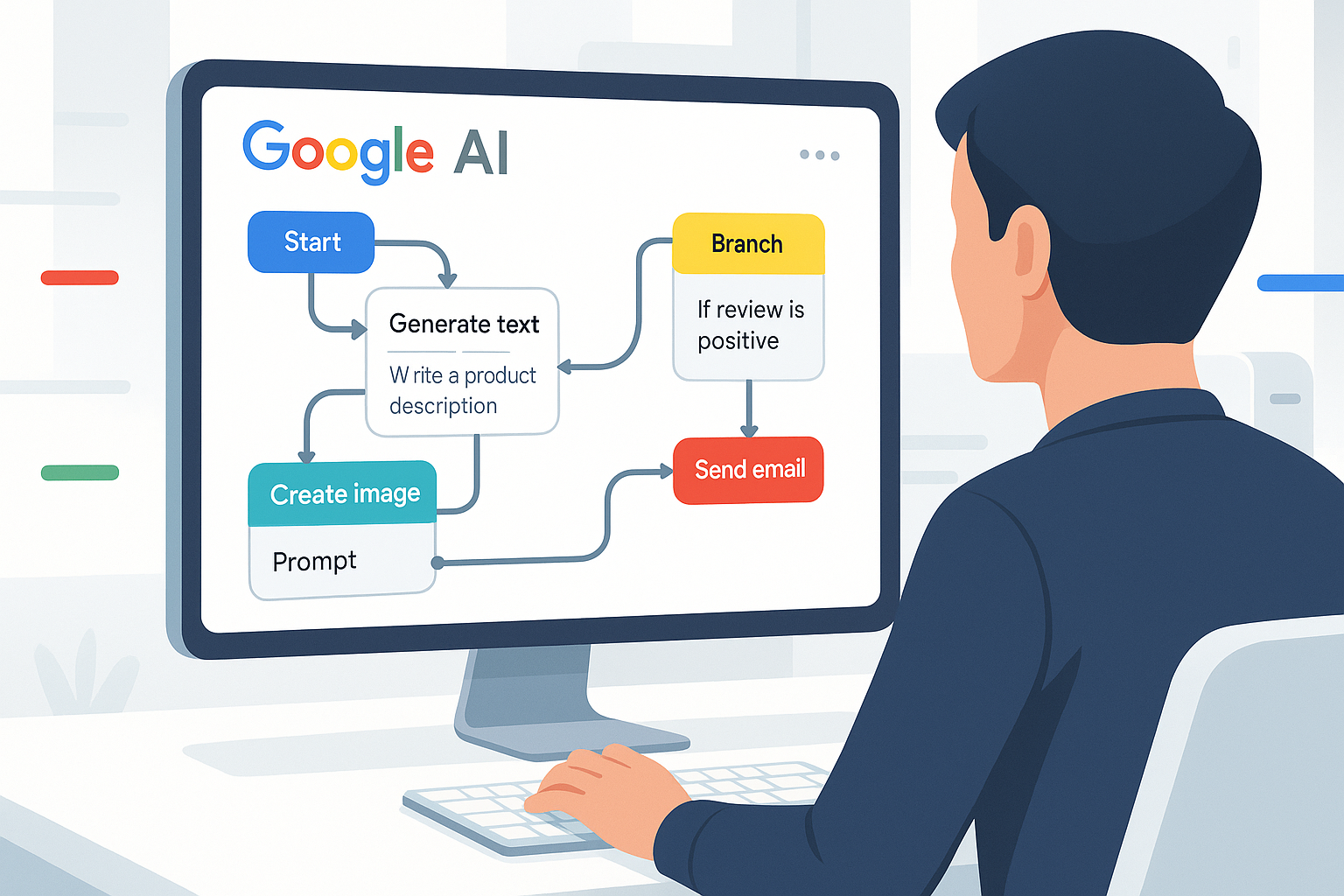
    “Google Opal: Empowering Everyone to Build AI Mini-Apps Without Writing Code”
    Google Opal: Empowering Everyone to Build AI Mini-Apps Without Writing Code
    Share
    Facebook Twitter LinkedIn Pinterest Email Copy Link

    Introduction

    Artificial Intelligence is becoming part of everyday tools, from automation to creative workflows. But until recently, creating AI-powered applications required coding knowledge and technical skills. That’s where Google Opal steps in.
    Google Opal is a new no-code AI app-building platform that lets anyone design, build, and share AI-driven mini-apps directly through an intuitive visual interface. It’s designed for creators, businesses, and teams who want to automate tasks or create intelligent solutions without writing a single line of code.

    In this blog, we’ll break down what Google Opal is, how it works, and why it represents the next big step in accessible AI development.

    What is Google Opal?

    Google Opal is Google’s upcoming no-code platform that allows users to build AI mini-apps, lightweight applications that use generative AI to perform tasks, automate workflows, or enhance productivity.

    Unlike traditional app builders, Google Opal focuses on AI integration and prompt-based logic, making it easy for non-technical users to create intelligent tools through simple configurations.

    Whether it’s a personal assistant, data summarizer, content generator, or workflow bot, Opal lets users turn an idea into a working AI app within minutes.

    How Google Opal Works

    Google Opal simplifies the app-building process into a few clear steps:

    1. Visual Interface – Instead of writing code, users design apps through a visual editor, connecting logic blocks and prompts.
    2. AI Models – Opal uses Google’s advanced AI models (like Gemini) to power text, image, and data generation.
    3. Integrations – You can connect Opal apps with Google Workspace tools like Docs, Sheets, and Gmail to automate tasks.
    4. Publishing and Sharing – Once the app is ready, it can be shared internally with teams or publicly with users, just like a web app.

    This makes it ideal for creators who want to build customized AI solutions quickly without needing to hire developers or manage backend systems.

    Key Features of Google Opal

    • No-Code App Builder: Build AI tools visually through drag-and-drop elements.
    • Built-in AI Models: Access Google’s Gemini models for text, reasoning, and creativity.
    • Seamless Google Integration: Easily connect with Gmail, Sheets, Docs, and Drive.
    • Collaboration Tools: Share and collaborate in real time across teams.
    • Deploy Instantly: Publish apps securely with one click—no deployment setup needed.

    These features make Google Opal not just another no-code tool, but a unified AI development environment for the modern creator.

    Benefits of Using Google Opal

    1. Faster Development: Build functional AI apps within hours instead of weeks.
    2. No Technical Barriers: Ideal for marketers, educators, and teams without coding experience.
    3. Enhanced Productivity: Automate repetitive tasks and workflows effortlessly.
    4. Cost-Effective: Reduce the need for external developers and infrastructure.
    5. Scalable for Teams: Create and manage internal tools for operations, content, or analysis.

    In short, Google Opal empowers anyone to become an AI creator, transforming how teams and individuals approach problem-solving.

    Use Cases of Google Opal

    Here are a few real-world examples of what can be built with Google Opal:

    • AI Customer Support Assistant – Create a mini-app that answers customer questions instantly.
    • Content Generator Tool – Automate blog outlines, emails, or marketing copy.
    • Data Analyzer – Connect with Google Sheets to summarize or interpret data using AI.
    • Task Manager Bot – Set up daily reminders or reports for your team automatically.
    • Learning Assistant – Build personalized education bots for training or tutoring.

    The potential use cases grow as AI becomes more capable and connected across Google’s ecosystem.

    Why Google Opal Matters

    The launch of Google Opal signals a major shift toward democratizing AI development. Just as website builders made web creation accessible to everyone, Opal aims to make AI creation equally simple and visual.

    It fits perfectly into Google’s long-term strategy of merging AI with productivity tools, enabling users to create solutions that suit their exact needs, not just rely on pre-built software.

    🔗 Internal Link Suggestions (for Codeblib)

    • Google Opal vs N8N on Conversational Simplicity and Deep API Control
    • Why the AI Browser Race Matters in 2025: Atlas vs Chrome vs Edge
    • OpenAI’s ChatGPT Atlas Browser: How It Could Redefine Web Search in 2025

    Final Thoughts

    Google Opal represents the next evolution in AI accessibility. It empowers individuals and organizations to create, automate, and innovate without depending on complex code or infrastructure.

    Whether you’re a content creator, business owner, or developer exploring AI workflows, Opal could become your gateway to building custom AI solutions that save time and enhance productivity.

    If you’re ready to explore the future of no-code AI, Google Opal is the tool worth watching.

    ai ai automation
    Share. Facebook Twitter Pinterest LinkedIn Tumblr Email Copy Link
    Unknown's avatar
    codeblib

    Related Posts

    The Future of AI Browsing: What Aera Browser Brings to Developers and Teams

    November 24, 2025

    Gemini 3 for Developers: New Tools, API Changes, and Coding Features Explained

    November 22, 2025

    Google Gemini 3 Launched: What’s New and Why It Matters

    November 19, 2025

    A Deep Dive Into Firefox AI Features: Chat Window, Shake-to-Summarize, and More

    November 18, 2025

    10 Tasks You Can Automate Today with Qoder

    November 16, 2025

    How Qoder’ Quest Mode Replaces Hours of Dev Work

    November 15, 2025
    Add A Comment

    Comments are closed.

    Categories
    • Career & Industry
    • Editor's Picks
    • Featured
    • Mobile Development
    • Tools & Technologies
    • Web Development
    Latest Posts

    React 19: Mastering the useActionState Hook

    January 6, 2025

    Snap & Code: Crafting a Powerful Camera App with React Native

    January 1, 2025

    Progressive Web Apps: The Future of Web Development

    December 18, 2024

    The Future of React: What React 19 Brings to the Table

    December 11, 2024
    Stay In Touch
    • Instagram
    • YouTube
    • LinkedIn
    About Us
    About Us

    At Codeblib, we believe that learning should be accessible, impactful, and, above all, inspiring. Our blog delivers expert-driven guides, in-depth tutorials, and actionable insights tailored for both beginners and seasoned professionals.

    Email Us: info@codeblib.com

    Our Picks

    The Future of AI Browsing: What Aera Browser Brings to Developers and Teams

    November 24, 2025

    Gemini 3 for Developers: New Tools, API Changes, and Coding Features Explained

    November 22, 2025

    Google Gemini 3 Launched: What’s New and Why It Matters

    November 19, 2025
    Most Popular

    How Qoder’ Quest Mode Replaces Hours of Dev Work

    November 15, 2025

    Firefox AI Window Explained: How Mozilla Is Redefining the AI Browser

    November 14, 2025

    Integrating Aera Browser with Your Tech Stack: APIs, Webhooks & Zapier

    November 12, 2025
    Instagram LinkedIn X (Twitter)
    • Home
    • Web Development
    • Mobile Development
    • Career & Industry
    • Tools & Technologies
    © 2025 Codeblib Designed by codeblib Team

    Type above and press Enter to search. Press Esc to cancel.